
How to fill a residence application in MOS 2.0 in 2026
From 27 April 2026, paper applications for a residence card on most grounds no longer exist. Not “almost refused”. Not “better to use the system”. They are gone — in Warsaw, Kraków, Wrocław and everywhere else.
If your envelope lands in the office mailbox on 27 April, it may never be opened as an application. The mailing date does not matter. Only the date of actual receipt at the chancellery counts. Many people learn this too late: the envelope is gone, and a week later there is silence.
For most applicants the only working path is MOS 2.0. The honest question follows: how do you complete the form so it does not vanish into a draft, bounce with an error, or force a restart months later? Full guide below — each topic once, in depth.
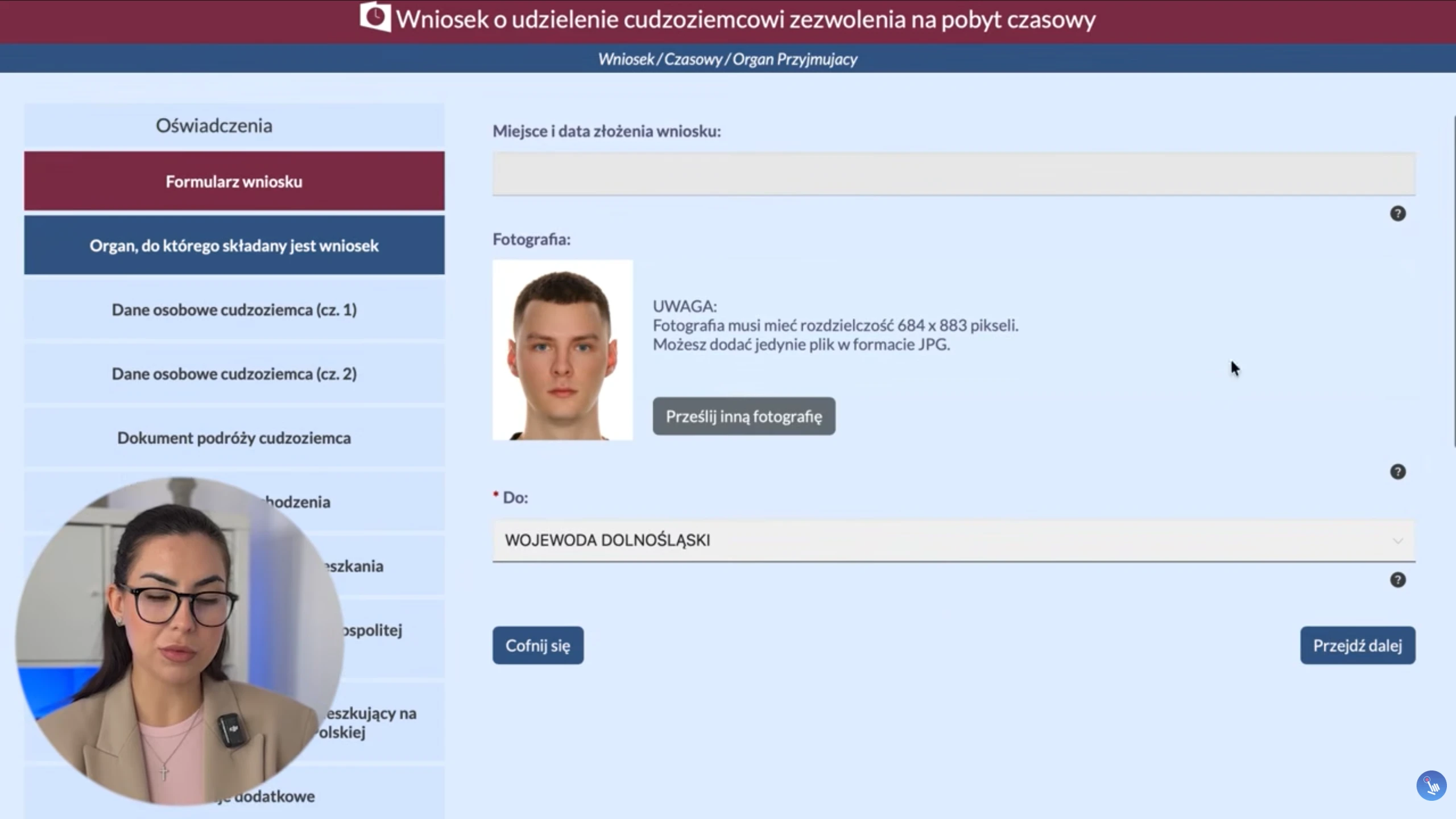
Video walkthrough. ONE PLUS specialist Tatiana Vyborna shows the screen step by step: login, clicks and checkpoints while filing for a residence card.
What MOS 2.0 is for
MOS means Moduł Obsługi Spraw — the state portal that now covers completion, uploads, signature and dispatch to the voivodeship office. UDSC also publishes official notices.
MOS is only the filing form. It will not verify that you chose the right ground, will not flag a missing exhibit, and will not write to the case officer for you. It is a door. What happens behind it depends on case preparation and later correspondence.
Portal address: mos.cudzoziemcy.gov.pl.
Applications that must go through MOS
- temporary stay — work, study, business, family reunification (core residence permit);
- permanent stay — Polish roots, marriage to a Polish citizen, etc.;
- EU long-term resident — typically 5+ years of lawful stay;
- CUKR card — for people with UKR status (from 4 May 2026 on the current schedule).
Who may still file on paper
- intra-corporate transfers (ICT);
- long-term mobility;
- family reunification when the applicant is outside Poland;
- family members of Polish / EU / UK citizens — also when the person is not in Poland.
If you are on the exception list, file in person or by post. Everyone else prepares the electronic route. Representation documents may help in other steps, but the MOS signature remains personal.
What to prepare BEFORE you type
Most problems start before MOS opens.
Technical requirements
- MOS account;
- login.gov.pl access;
- Profil Zaufany or qualified signature;
- working email and phone;
- current PESEL and verified personal data.
Never share login credentials. Even with a consultant’s help, the applicant signs personally.
Digital documents
- JPG photo (min. 684×883 px, ≤2.5 MB);
- scans of all passport pages;
- fee proofs;
- 100 zł card-issuance fee proof where applicable;
- ground-specific documents; foreign acts often need sworn translation and apostille.
Photos without pain
Phone photos rarely fit. Use DocPhoto Online to produce a MOS-ready file.
Family reunification: what MOS now demands
Early filings show stricter fields: passport data, address in the country of origin, address in the previous country of stay. MOS builds a fuller movement history.
Example: Ukraine → years in Spain → Poland. The form asks for that path. At the end you must write why this ground applies. It is among the first things the officer reads. Plan translations and document legalisation early.
Filing for minors
Children 13+ need their own Profil Zaufany; attach via “dołącz istniejące konto” using the ID from the child’s “dane osobowe”. Under 13: “utwórz nowe konto” inside the parent cabinet. “Dodaj konto istniejące” is for adults needing a representative — not for children. Errors here stall cases for weeks.
Załącznik nr 1 — the system’s weak point
For work, study, traineeship or volunteering, MOS emails a 30-day link so the employer/organisation can complete Annex no. 1. Without a signed annex, Send stays locked.
Three annex mistakes
- no Profil Zaufany on the signer’s side;
- wrong email — link goes nowhere;
- trying to bypass with a printed PDF — each party signs via their own link.
A corrected annex can sometimes be brought to fingerprints. Better: no errors at the start, especially in large companies where emails vanish between departments.
After you click Send
MOS issues UPO. Save it immediately. Without UPO the filing is not safely evidenced.
- an office clerk reviews the application;
- zaświadczenie o złożeniu wniosku appears after review — replaces the old red stamp and confirms lawful stay until a decision;
- in-person visit: fingerprints, signature specimen, original passport;
- decisions and requests via eDoręczenia.
eDoręczenia: missing a letter means missing a deadline
From 2026, official office mail runs through eDoręczenia — state e-delivery with legal effect. A message counts as delivered even if unread. Miss an officer letter and you miss the reply window — a procedural risk for the case.
Warsaw note: MOS cases often accept supplements only electronically. The visit is for fingerprints and passport checks.
The hard part is not filling the form
Completing the application is roughly 20% of the path. The other 80% is officer communication, replies, clarifications, translations, complaints when the case freezes, and acceleration where experience matters.
MOS makes filing more convenient technically — not simpler bureaucratically. A perfect form, signed annex and UPO can still be followed by months of silence or a seven-day request. That is the current first-wave reality, not scare tactics.
Where ONE PLUS fits
We do not sell “just fill the form”. You can do that yourself. We take what comes around and after:
- situation analysis and ground selection for a residence card;
- full pack preparation including translations and apostille;
- MOS + eDoręczenia setup;
- employer coordination on Annex no. 1;
- correspondence control and on-time replies;
- procedural steps if the case stalls;
- support through card collection.
If a refusal arrives, appeal under the same contract with no extra fee (per engagement terms). We do not guarantee a positive outcome — the authority decides. We structure the process so deadlines and first-wave technical mistakes are not wasted.
Who handles the cases
Tatiana Vyborna is a qualified specialist in administrative and civil law, residence legalisation and employment of foreigners in Poland. She graduated from the Faculty of Law at the University of Wrocław and Uniwersytet Ekonomiczny we Wrocławiu, completing postgraduate studies on residence legalisation and foreigner employment.

Over 10 years of daily work with public bodies and international companies. She has represented clients in inspections before the Border Guard, Labour Inspectorate, Tax Office and ZUS. She offers clear legal consultations, document guidance and stage-by-stage support. Languages: English, Polish, Ukrainian and Russian.
Book a consultation
Tell us your situation. We will map how realistic the route is, which option fits better, expected timelines and risk points. Use the contact page or the form below — we reply within a business day.
Practical checklist before you hit Send
Before submitting, re-check: the legal ground matches your evidence; photo and scans are readable; every passport page is uploaded; fee proofs are attached; the employer email was confirmed by phone; the annex signer’s Profil Zaufany works; eDoręczenia is set up for the person who will monitor the case. Align Latin-script name spelling with the passport — mismatches with PESEL trigger later clarifications.
If the pack includes foreign civil-status acts, do not leave sworn translation and apostille “for after UPO”. Officers often set short reply windows, and production takes days. ONE PLUS usually prepares this layer in parallel with MOS setup so the case does not freeze mid-way.
Brief HR in plain language: what Annex no. 1 is, where the email arrives, who must sign, and what to do if it lands in spam. That alone prevents many “we never received anything” delays. For family and business grounds, decide early which steps need representation documents outside the MOS signature itself.
After filing, set reminders: check eDoręczenia daily in the first weeks, keep UPO in cloud and on your phone, watch MOS status. When a request appears — read the deadline first, gather files second, reply third. That rhythm separates “I filled a form” from real residence-card case management.
How ONE PLUS runs a MOS 2.0 process
In consultation we lock the legal ground, voivodeship, status timeline and document risks. Then we assemble the pack, set up access, align the purpose statement and the employer annex scenario. After UPO we keep a request calendar and draft replies that respect deadlines. Extra services — PESEL, translations, apostille — stay in the same workflow instead of scattered offices.
This does not ban DIY filing: if you complete the form yourself, a consultation still helps avoid ground and checklist mistakes. For full support, contact the team with your ground, city and whether Profil Zaufany is already active.
A practical checklist before you hit submit in MOS 2.0
Before you send anything in MOS, walk through a calm checklist. Confirm the legal basis, match passport data with your travel document, and open every scan to make sure nothing is cropped. If you need a sworn translation or an apostille, finish that before upload — not after an office request. Also confirm your PESEL details and that your delivery address actually works.
- Build the file around your real basis: work, study, business, family reunification residence permit, or another path.
- Ukrainian nationals should compare a standard residence card (TRC) route with the CUKR residence card option when relevant.
- For guided online filing, use MOS 2.0 filing support so small form mistakes do not become big delays.
- If someone files for you, prepare a clear power of attorney in Wrocław with the right scope.
What ONE PLUS checks in real cases
ONE PLUS and Tatiana Vyborna do not only ask “are the boxes filled?”. We check whether the form, attachments and story match. We look for date conflicts, name spelling issues and weak evidence before the voivodeship office does. Always cross-check official rules on the UDSC website and file through MOS 2.0. No agency can promise a positive decision. Our job is to make your package clear, complete and consistent.
After filing, stay active: watch the status, read e-Doręczenia messages and keep every confirmation. If the office asks for more documents, answer with calm, readable scans. If you already think about the next stage — permanent residence or later Polish citizenship — plan early instead of rushing in the last month of your card.
Short answers clients ask most often
Can I fix the form after sending? Sometimes, but not always with one click. Check carefully before submit. Do I need translation for every paper? No — only what your basis and local practice require; that is where targeted sworn translation helps. Where do I start if MOS feels confusing? Write via the ONE PLUS contact page and we will break the steps into plain language.
About Annex no. 1 and family files: even a small mismatch in the family link can slow the case. For children and partners, build the logic through family reunification residence permit from day one instead of adding papers at the last minute. If you are unsure which basis is stronger in your situation, compare options via the ONE PLUS contact page.
How to strengthen a MOS 2.0 residence application in 2026
“How to fill a residence application in MOS” is not only clicking fields. Before you sign, run this control frame:
- Meaning — one legal ground, one evidence set;
- Form — correct application type in MOS;
- Files — readable scans, consistent names and dates;
- Communication — who reads letters, in which channel;
- Finish — biometrics → decision → card → everyday steps.
Risk map by legal ground
- Work — contract and conditions match the claim;
- Study — student status and funds;
- Business — signs of real activity, not only KRS;
- Family — civil-status acts and a careful Załącznik;
- Other — check current UDSC / office lists.
Cold checklist before you click submit
- Application type matches the real ground.
- Travel-document data is consistent everywhere.
- Załącznik nr 1 (if used) matches civil-status papers.
- Correspondence address in Poland works.
- Someone owns status monitoring and mailbox checks.
- You have a plan for wezwanie, biometrics, and the card fee.
Service anchors: residence card, sworn translation, apostille, PESEL, contact.
Where MOS 2.0 files usually break: Załącznik nr 1 and missed letters
Family data mismatches and ignored electronic letters create the most damage after a “successful” click. Before you submit, compare names and dates with civil-status acts and assign someone to check status and mailboxes daily.
- Export/PDF the application for a cold read.
- Align Załącznik data with supporting acts.
- Assign owners for MOS status and e-Doręczenia.
- Prepare a reply template for a typical wezwanie.
What ONE PLUS checks in real filings: one coherent story, readable files, no Załącznik contradictions, a plan for wezwanie and biometrics, and a finish line with card + PESEL. Contact.
Typical foreigner mistakes inside MOS 2.0
- choosing a “similar” application type instead of the real ground;
- uploading an incomplete set just to hit a date;
- ignoring deadlines in office letters;
- changing job/address/family composition without updating evidence;
- assuming online filing cancels regional office rules.
Service loop: residence card, sworn translations, apostille, PESEL. Questions: contact. Practice: Tatiana Vyborna.
Book a consultation
Frequently asked questions
Yes. You will then handle office correspondence, eDoręczenia and requests alone. Mistakes in replies often cost more than mistakes in the form.
It still counts as delivered. Missing the deadline creates procedural risk, including a negative decision path.
Formal KPA timelines exist, but practice varies widely by voivodeship load. Plan in months, not weeks.
From age 13 — yes, their own. Under 13 — create the child profile via the parent cabinet without a separate trusted profile.
Send stays locked. Check email, the signer’s Profil Zaufany and the 30-day link. Coordinate early.
For most grounds — no. Paper survived only for narrow exceptions. Outside them, post-26 April 2026 envelopes may not count as applications.
No. UPO proves system receipt. Lawful stay until a decision is confirmed by zaświadczenie o złożeniu wniosku after office review.
No. Authorities decide. We support preparation, filing and correspondence to reduce technical and procedural errors.
Foreign civil-status certificates, diplomas and administrative/court acts. Plan sworn translation and apostille before MOS uploads.


