4,7
4,7
U
Użytkownik DocPhoto
DocPhoto user feedback★★★★★Very fast

Upload a clear photo, save a 684×883 px JPEG for MOS 2.0. Processing takes place in your browser; the original photo is not uploaded to the editor server.
It takes two minutes. Your feedback helps us improve the editor and helps others decide if it suits them. We publish it only with your consent, after a quick review.
It is now awaiting moderation. After review we will publish it on the page.
DocPhoto Online: prepare a photo for a Polish residence card in MOS 2.0
We covered detailed requirements, MOS 2.0 standards and common mistakes in our article MOS 2.0 Residence Permit Photo: How to Make It Online.
From 27 April 2026, applications for residence permits in Poland through MOS are submitted electronically. This applies to applications for temporary residence, permanent residence and EU long-term resident status, except for specific cases where paper submission remains available.
When applying online, you need more than a completed form and documents. You also need a digital photo that the MOS system can accept. If the file has the wrong dimensions, format, ratio, size or crop, the upload may become a problem.
DocPhoto Online by ONE PLUS helps you crop, adjust and prepare a photo for a Polish residence card online. It is designed for users who need to adapt an existing photo to the MOS 2.0 format: 35×45 mm, 684×883 px, JPG, up to 2.5 MB.
In electronic applications, the photo is uploaded as a file. It is not enough for the picture to “look good”. The file must also meet technical requirements.
A common problem is that a photo taken with a phone has a different ratio, is saved as HEIC or PNG, is too large, or has too much background around the face. DocPhoto Online helps correct the crop and prepare the image for online submission.
Before uploading a photo to MOS, check the following:
The most frequent reasons are:
DocPhoto Online prepares the technical format of an otherwise suitable photo: it resizes the image, offers placement options and saves a JPEG. A central crop does not replace precise positioning of the head. Use DocPhoto Premium to choose the exact area and reposition the frame. Both public tools run in your browser; they currently offer neither AI background replacement nor paid processing.
With DocPhoto Online, you can:
Use the Premium version if:
DocPhoto Online quickly changes the dimensions and format of a good source photo. Choose a central crop or fit the image with margins, review the result and save a JPEG.
DocPhoto Premium adds manual crop and zoom controls and preliminary face detection. It is more useful when the face is off-centre or there is too much space around the head. Face detection provides a starting point, but you still need to review the final photo.
DocPhoto Online: DocPhoto Online
DocPhoto Premium: DocPhoto Premium
Choose a photo from your phone or computer. Use the best available original file. Avoid screenshots, compressed messenger images and photos with filters.
Adjust the frame so that the head and upper shoulders are visible and the face is centred. Remove excessive background and keep the document-photo look.
The 35×45 mm ratio is the standard document photo format used in Poland. DocPhoto Online helps keep the correct vertical proportion instead of simply stretching the image.
Export the prepared photo in JPG format and use it in your MOS 2.0 application.
Make sure the photo:
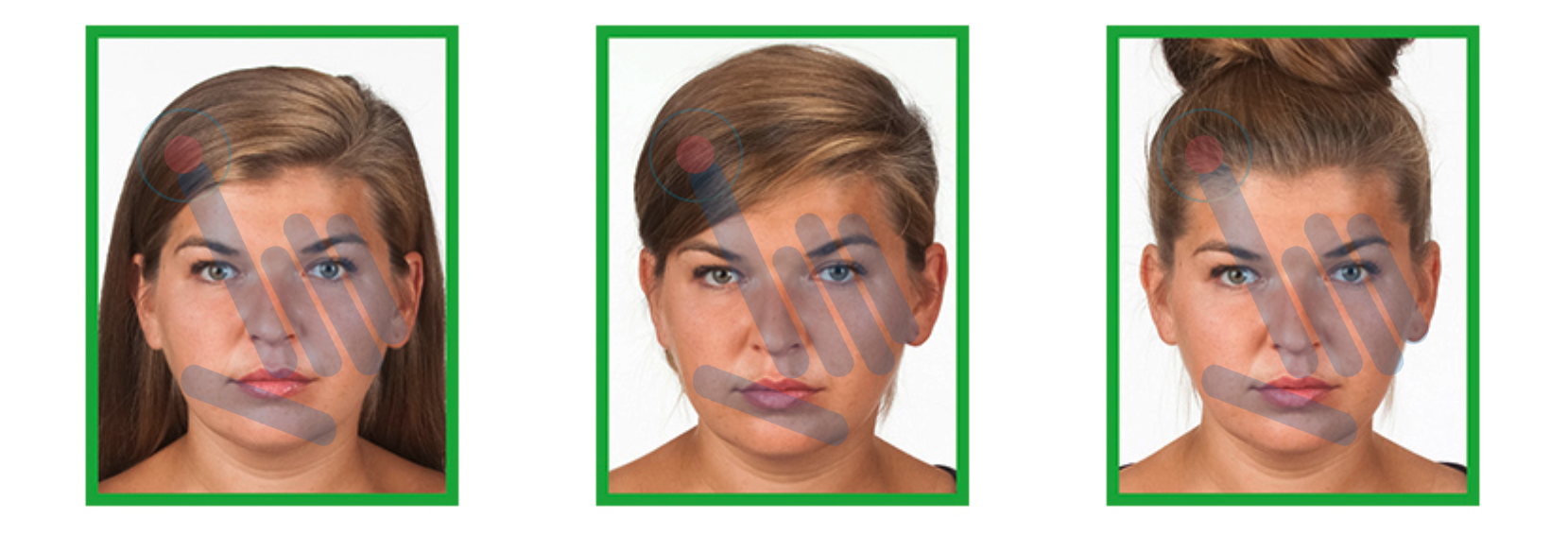
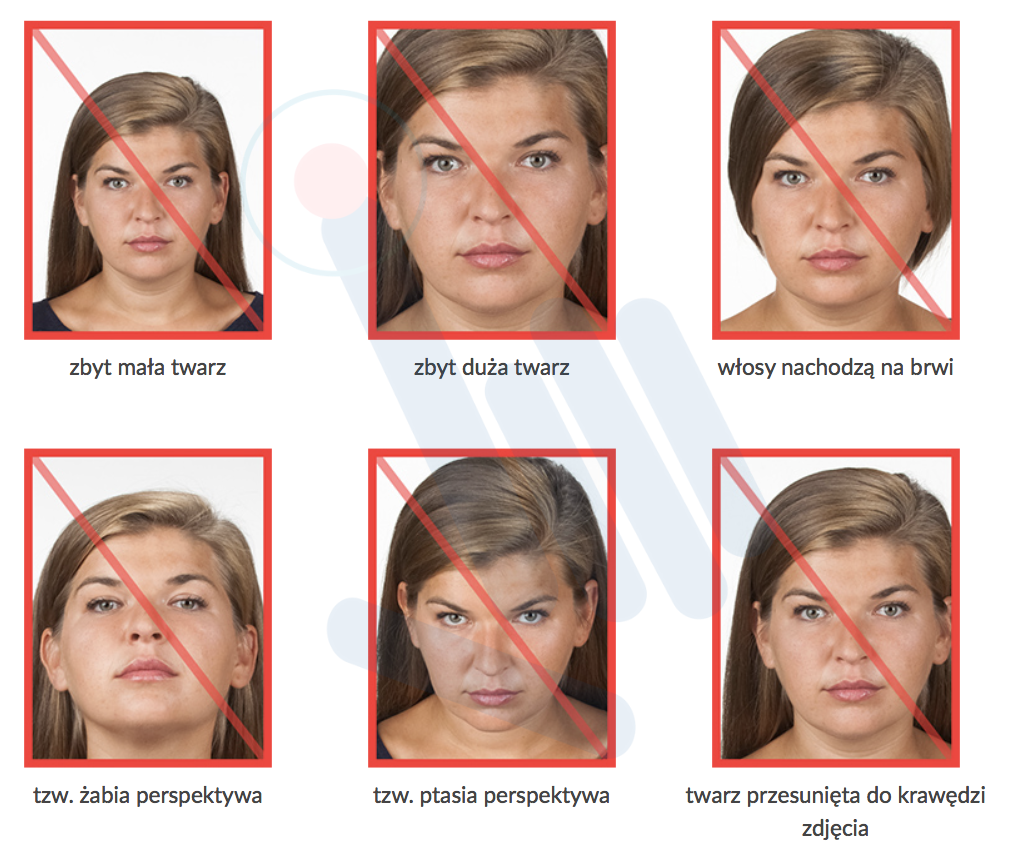
The face should be visible from the top of the head to the upper shoulders. The person should look directly into the camera. The head should not be turned. Eyes must be open and hair should not cover the face.
Use a sharp, clear image with a light and plain background. Avoid dark photos, shadows, filters, strong retouching and wide-angle distortions.
iPhone HEIC files, PNG or WEBP images may cause upload problems. JPG is the safest format for MOS submission.
A good-looking photo can still fail if it is not 684×883 px. DocPhoto Online helps prepare the required output size.
If the face is too small, too large or moved to one side, the photo may not meet document standards. Premium cropping helps fix the frame.
Do not use an old image. A residence card photo should reflect your current appearance.
Avoid selfies with beauty filters, face smoothing, distortion or unnatural lighting.
A digital photo is needed when applying for temporary residence through MOS.
Permanent residence applications also require a correctly prepared photo file.
Applicants for EU long-term resident status should also prepare a proper digital photo.
The same type of photo may be required in other electronic procedures where MOS asks for a residence card photo.
ONE PLUS works with foreigners applying for legal stay in Poland. The same issues appear repeatedly: wrong file type, wrong crop, wrong dimensions, file too large or a photo that MOS cannot accept.
You do not need Photoshop or advanced graphic software. DocPhoto Online helps prepare the photo online.
Simply resizing a photo may distort the face or keep a bad crop. Premium mode focuses on adapting the frame to document-photo requirements.
DocPhoto Online helps with the photo, but the full MOS application also requires proper documents, correct legal grounds and careful form completion.
ONE PLUS can help with:
If you need precise cropping and more control, use DocPhoto Premium:
Yes. DocPhoto Online lets you upload a photo, crop it and prepare it for MOS 2.0.
The commonly used technical size is 684×883 px, in JPG format, with a 35×45 mm document-photo ratio.
Yes, if it is clear, sharp, taken on a light background and shows your face correctly.
Check file format, dimensions, file size, ratio and crop. Then prepare the photo again in DocPhoto Online.
No. The tool helps with crop and file preparation, but the original photo must still meet document-photo quality rules.
Use DocPhoto Online by ONE PLUS if you need to crop a photo for a residence card, adapt a photo for MOS 2.0, prepare a JPG 684×883 px file and keep the 35×45 mm document-photo ratio.
It is a practical online tool for foreigners preparing a Polish residence card application through MOS.
A photo is only one file in a larger case. Even a perfect JPG does not replace the legal logic of your application. After you prepare the image in DocPhoto Online, the usual next steps are: choose the stay basis, gather evidence, finish required translations, and then submit through MOS 2.0.
ONE PLUS and Tatiana Vyborna help connect the technical part with the practical one:
Always cross-check official rules on the UDSC website. No agency can promise a positive office decision. Our job is to make your package clear, complete and consistent.
1. Take a clean source photo on a light background. 2. Fit the file in DocPhoto Online to 684×883 px / JPG. 3. If the crop still feels wrong, move to DocPhoto Premium. 4. Prepare documents for your basis and finish translations/apostille early. 5. Submit in MOS and monitor e-Doręczenia.
To review your specific case in plain language, write via the ONE PLUS contact page.
Choose the original camera photo or the file supplied by your photographer. It should be sharp, showing the top of your head, your entire face and the upper part of your shoulders, with no hair covering your eyes. Soft daylight from a window is usually easier to work with than direct sunlight or strong shadows. Hold the camera at eye level and look straight into the lens. If the head is turned significantly, the eyes are closed or the image is badly blurred, take another photo: cropping alone cannot correct these problems.
The editor accepts JPG, PNG and WebP files up to 12 MB. The current processor does not support HEIC or HEIF. If your iPhone saved the photo in one of these formats, export a JPEG first; changing the filename extension does not convert the file. Use the original rather than a screenshot whenever possible, because the original generally retains more of the detail needed for a clear document photo.
The tool exports a 684×883 px image. The official requirements specify a minimum resolution of 684×883 px, JPG format and a maximum file size of 2.5 MB; the MOS technical-help section also lists the exact dimensions 684×883 px. The 35×45 mm document format describes the photo proportions. Digital export uses the specified pixel dimensions: do not stretch a face to change its proportions.
Having enough pixels does not confirm that the crop is correct. Selecting a tiny area of a large image can produce a soft result when enlarged to the export dimensions. Open the saved JPEG and inspect the eyes, hair, outline of the head and facial detail. Review the actual exported file rather than relying only on the original image or an editor message.
Automatic face detection in Premium helps position the initial crop. It is a cropping aid, not confirmation that MOS or the authority will accept the photo. Check that the top of the head is visible, the face occupies approximately 70–80% of the frame, the person looks straight ahead, the eye line is horizontal, the mouth is closed and the expression is natural.
The background should be light and uniform. Adding white margins does not remove a dark background within the original image. The current public Online and Premium tools do not replace backgrounds using AI, generate a new portrait or apply cosmetic facial retouching. Specific exceptions and supporting documents apply to dark glasses and religious head coverings. In those cases, consult the official requirements instead of relying solely on a general editor checklist.
In the current public editors, your photo is processed locally in your browser and is not uploaded to the DocPhoto server. Premium downloads its face-detection library and models after you select a photo. You can still adjust the crop manually if the connection is slow or analysis is unavailable. Keep the page open until you have saved the result: the editor does not create a personal cloud photo archive.
After downloading, check that the JPEG is on your device and opens correctly. On a phone, look in the browser downloads or the Files app. Upload the exported JPEG to MOS, not the original PNG, WebP or HEIC. The user must confirm when the photo was taken: neither its appearance nor its metadata reliably establishes that it is recent enough.
Review the current rules in the official UdSC questions and answers. Your photo must have been taken within the previous six months. Correct technical parameters and a successful upload do not replace the authority’s assessment. If MOS reports an error, keep the exact message, check the format, dimensions and file size again, and prepare a new photo or contact the system’s technical support if necessary.
Sign in to MOS and sign your application using your own account. Do not share your MOS or login.gov.pl password. ONE PLUS can help you organise the documents, understand the grounds for your stay and plan the next steps, but a technically correct photo alone does not guarantee a positive decision on your application.























DocPhoto user feedback★★★★★Very fast
DocPhoto user feedback★★★★★Very helpful
Good morning! I would like to thank your company for the help in obtaining a residence permit. You are great! At first I was very worried, but Tatiana was in touch the whole time and now, 10 months have passed and I received a positive decision! Hooray, hooray! THANK YOU VERY MUCH! I recommend this company to everyone! Especially Tatiana, a true professional.
Nice office, they sorted out my residence card insurance very quickly. I highly recommend them!
I would like to thank ONE PLUS for their help in handling the formalities. It was my first time with this company and I was pleasantly surprised. They were always available, guided me fully through all the matters and answered questions, helped me and explained any doubts. Everything went quickly and smoothly, thanks to highly qualified specialists.
I have been working with this agency for a long time and I have never had any problems. All payments are made on time, the managers are always available, and everyone does their job professionally.
I would like to thank the ONE PLUS agency for their help in obtaining a residence permit.
We asked for advice about legalizing our stay in Poland and getting a residence card. Everything was clearly explained, they helped with the documents and were with us at every stage. They helped us get the residence card quite quickly, in about 4 months. I am very grateful for the professional help!
I contacted One Plus when there had been no progress in my case for a year and three months, and getting the "decision" took nine months. The supervisor answers every question quickly.
Friendly service and quick processing. I sent the fingerprints within a week and the decision was made. Thank you, One Plus.
I was looking for advice on setting up a company in Poland. They explained everything to me clearly and simply, and also helped me sort out the formalities and nuances. Thank you ☺️
I highly recommend working with them! Professional service, great contact, fast completion of the order and full commitment. Everything went smoothly and without problems. I will definitely use them again. Thank you and I recommend!
Hello! I would like to thank the company's team for their good and high quality work. Within a year, despite difficulties, we achieved positive results.
They do a great job. Anastasia from the One Plus team is the best in her field. I highly recommend them. They give professional advice and help you get the card quickly and efficiently ❤️
I contacted ONE PLUS about a Polish residence permit. I needed to sort out my documents and understand how to go through all the stages of the application correctly. I received legal advice, help with preparing the necessary documents and explanations about the next steps. Everything became much clearer; I didn't have to search through various sources myself. Thank you for the help and support.
We have been working together since 2019, all the documentation is handled by this wonderful company, which constantly monitors the situation and provides information instantly. Thank you for the fruitful and long-lasting cooperation.
Thank you for the excellent work ONE PLUS in Wroclaw. We are very pleased with the result, and this is not the first time we have come to you. And we are happy that we came to you. You are very good professionals and specialists.
I needed a duplicate birth certificate with an apostille. These gentlemen helped me with it, they got the matter done on time, and the prices were reasonable. I recommend.
Excellent help with handling documents in Poland.
Thank you for the new insoles for my work shoes. They are good quality and very comfortable for my feet.
Call Mon-Fri 09:00-17:00
 +48 71 880 85 08
Contact us online


We’ll call you back during business hours.
 We will tell you more about servicesInitial client consultationExpress situation audit
During business hours
Your data stays secure
Support with your case