MOS 2.0 Residence Permit Photo: How to Make It Online
Starting from 27 April 2026, all applications for a residence permit (karta pobytu) must be submitted exclusively through the MOS 2.0 system (Moduł Obsługi Spraw). Paper applications are no longer accepted by Voivodeship Offices.
One of the most common challenges faced by foreigners is preparing a photograph that meets the new technical requirements of the system. That is exactly why we created a free tool called DocPhoto Online, which solves this issue in just a few seconds.
Why do MOS 2.0 photo requirements create so many questions?
In Facebook groups, LinkedIn comments, and immigration forums, the same questions appear every day:
- What photo size is required for MOS 2.0 submission?
- My photo is too large, how do I resize it?
- What software should I use to prepare the photo?
- Can I use a photo taken with a smartphone?
The issue is very real. The MOS 2.0 system requires a photo in a strictly defined format: 684×883 pixels. A standard photo from a phone or camera almost always has different dimensions and cannot be accepted by the system without processing.
As a result, foreigners search for solutions online and often end up using paid applications, complex graphic editors, or services that require registration. We decided to change that approach.
Technical requirements of the MOS 2.0 system
What type of photo is accepted by the Voivodeship Office?
When submitting an application through MOS 2.0, the photograph must meet the following requirements:
- Size: 684×883 pixels
- File format: JPEG
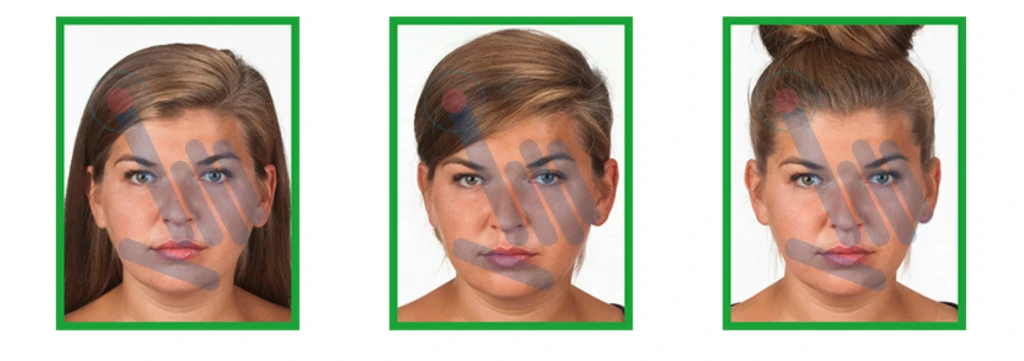
- Background: plain, light-colored (preferably white or light grey)
- Face: occupies 70–80% of the photo height
- Lighting: even, with no shadows on the face or background
- Facial expression: neutral, mouth closed, eyes open
What has changed compared to the previous system?
Previously, residence permit applications were submitted in person or through the ePUAP platform, and photographs were provided in printed form.
The new MOS 2.0 system requires digital submission with strictly defined technical parameters. For many foreigners, this is a completely new administrative requirement they have not encountered before.
Free tool for photo preparation
What is DocPhoto Online?
DocPhoto Online is a free tool created by the ONE PLUS Sp. z o.o. team, a legal company specializing in the legalization of foreigners’ stay in Poland.
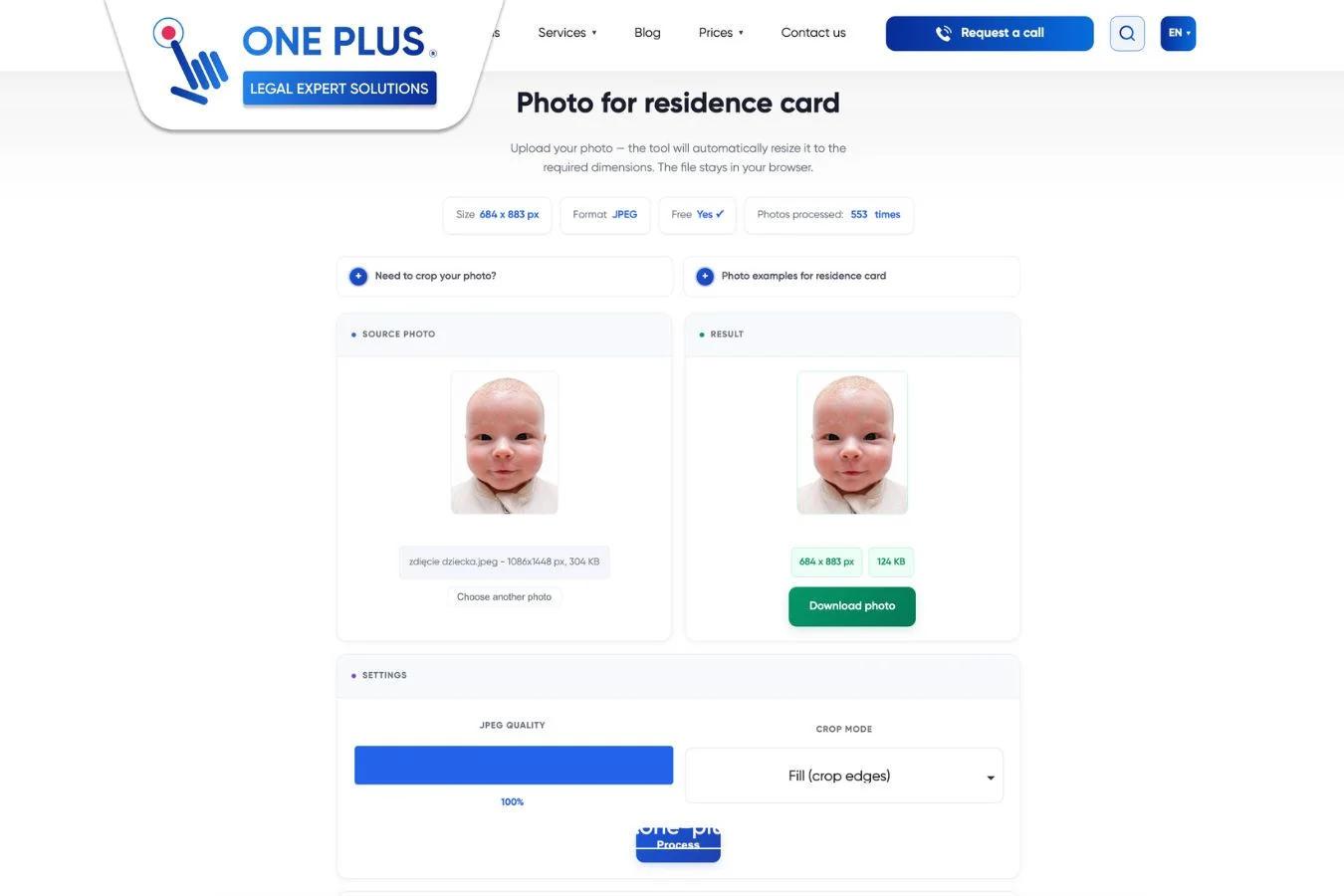
The tool automatically adjusts your photo to the required format of 684×883 pixels, making it ready for upload into the MOS 2.0 system.
How does DocPhoto Online work?
The process is simple and intuitive:
- Upload your photo — supported formats include JPG, PNG, and WEBP of any size
- Select the cropping mode — fill frame, fit, or stretch according to your preference
- Click “Process” — the tool automatically adjusts the image to 684×883 px
- Download the final file — in JPEG format, ready for MOS 2.0 submission
The entire process takes only a few seconds.
How is DocPhoto Online different from other tools?
Unlike other tools available online, DocPhoto Online provides:
- Completely free access — no hidden payments, no subscriptions, no limitations
- No registration required — no account creation or email submission needed
- Full privacy protection — images are processed directly in your browser and are not uploaded to any server. We operate in full compliance with Regulation (EU) 2016/679 (GDPR / RODO)
- Four language support — available in Polish, Ukrainian, English, and Russian
- No installation required — works directly in a browser on both desktop and mobile devices
Common mistakes when preparing photos for MOS 2.0
Mistake 1: Incorrect photo size
The most common issue is uploading a standard photo that does not match the required format. MOS 2.0 strictly requires 684×883 pixels. DocPhoto Online automatically solves this problem.
Mistake 2: Incorrect file format
The system only accepts JPEG files. Photos in PNG, HEIC (iPhone), or WEBP formats must be converted beforehand. Our tool automatically converts any uploaded file into JPEG format.
Mistake 3: Dark background or shadows on the face
This is an issue that software cannot fix. It depends on proper photo capture conditions. We recommend taking photos in natural daylight against a light-colored wall to avoid shadows and lighting inconsistencies.
Mistake 4: Incorrect face framing
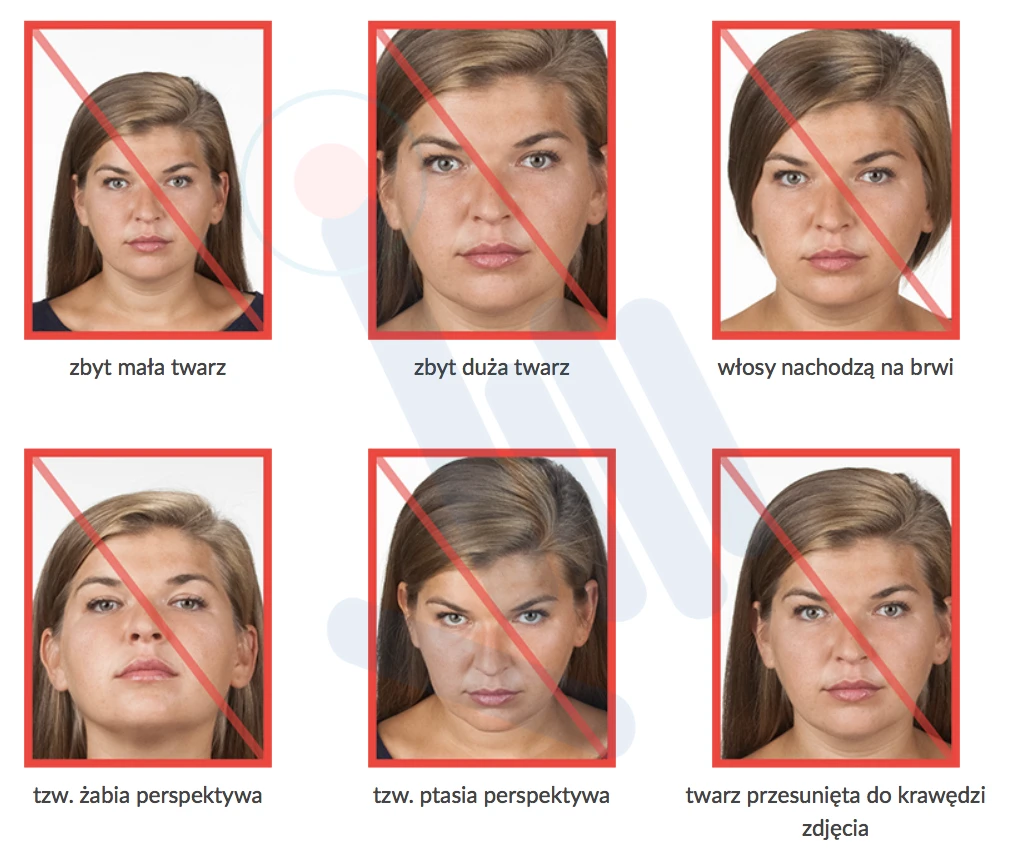
The Voivodeship Office requires the face to occupy 70–80% of the photo height. If there is too much empty space above the head, the application may be rejected by the system.
Who can use DocPhoto Online?
The tool is designed for all foreigners submitting applications through MOS 2.0, including:
- Citizens of Ukraine applying for temporary or permanent residence permits
- Citizens of Belarus and other CIS countries
- Foreign employees working in Polish companies
- International students at Polish universities
- All individuals undergoing legalization of stay in Poland
Need support with residence legalization?
DocPhoto Online is only one part of the support ecosystem provided by ONE PLUS.
If you need comprehensive assistance with:
- Submitting residence permit applications through MOS 2.0
- Preparing complete documentation packages
- Registering in the ePUAP system
- Obtaining a PESEL number
- Legalizing foreign employment
you can contact us. Our legal advisors and specialists in immigration processes will guide you through the entire procedure step by step.
Final summary
The new MOS 2.0 system has introduced strict technical requirements for residence permit photographs. Many foreigners lose time searching for tools or paying for services that are not actually necessary.
DocPhoto Online solves this problem in a simple way — free of charge, without registration, within seconds, and in four languages.
Use the tool here:
https://www.one-plus.pl/en/docphoto/
